In Codex
Use ChatCut Pixel Art to explain how inventory management works in games. Make it 30 seconds, 16:9, 720p, with English narration and subtitles. If a character needs a reference, ask me before generation.
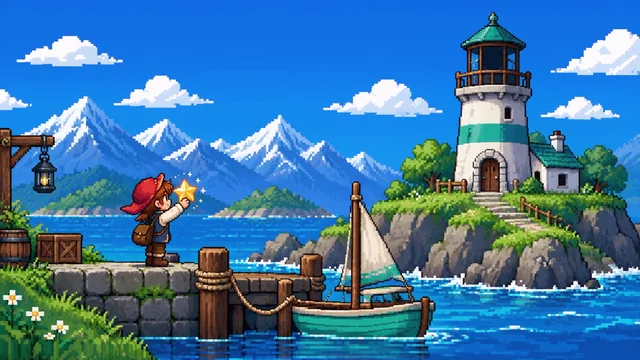
Make narrated retro stories and gaming explainers with pixel characters, game-style scenes, and an editable timeline.
Archive CollagePro
What happens next
Video and image generation require a paid plan and credits; ChatCut shows estimates before running. Pixel Art workflow details






Trusted by 400,000+ creators
Pixel Art opens first; switch templates only when you want a different visual style.
Build a narrated video around pixel characters and a clear idea.
Use the Pixel Art style for game-inspired settings, retro stories, and playful explainers.
When a pictured character needs a reference, the Agent asks whether to use your image or design one.
Paste exact wording to keep, or describe a gaming topic and let the Agent write the narration.
Watch the illustrated preview and one animated sample before approving animation for the remaining scenes.
Start with a story, then establish any characters before pictures are generated.
Choose Pixel Art, add a topic or exact script, and set the runtime, voice, language, shape, resolution, and subtitles.
In ChatCut, sign in and answer the character question if needed; check estimates before generation begins.
Approve the first sample, full illustrated preview, and animated sample in order; then finish the approved video on the timeline.
Pixel Art suits stories and explanations with a game-inspired visual world.
Explain an idea such as saving progress or managing an inventory through narrated pixel scenes.
Tell an original adventure with pixel characters and game-style settings.
Explain a simple concept with a retro visual theme, narration, and optional captions.
Use ChatCut through Codex or Claude Code with the connected plugin and your ChatCut account.
In Codex
Use ChatCut Pixel Art to explain how inventory management works in games. Make it 30 seconds, 16:9, 720p, with English narration and subtitles. If a character needs a reference, ask me before generation.
In Claude Code
Make a 15-second Pixel Art story in ChatCut about a gardener finding a glowing seed. Use 9:16, 720p, and English narration. Ask about the pictured character first, then pause after each sample and preview.
Also on Grok and Antigravity. See all plugins.
Your result lands in a ChatCut project. Trim it, add captions, a voiceover or music, then export. Manual editing and export do not use credits.
100+ Skills. No experience needed. Start in one click.
Unlock member features, models, and export allowances. Get more credits every month
Billed annually · $252
16% offBilled annually · $456
24% offBilled annually · $864
28% offBilled annually · $1692
30% off$0No credit card required
Some features are completely free in Codex, Claude, and WorkBuddy. Learn More
| Credits per month | Monthly | Annual |
|---|---|---|
| Starter · 100 credits / month | $25/month Billed monthly | $21/month $252 · Billed annually |
| Plus · 200 credits / month | $48/month Billed monthly | $38/month $456 · Billed annually |
| Pro · 400 credits / month | $92/month Billed monthly | $72/month $864 · Billed annually |
| Max · 800 credits / month | $180/month Billed monthly | $141/month $1692 · Billed annually |
| Max · 1,200 credits / month | $270/month Billed monthly | $211/month $2532 · Billed annually |
| Max · 2,000 credits / month | $450/month Billed monthly | $351/month $4212 · Billed annually |
This Skill creates narrated videos with pixel characters and retro game-style scenes. It is meant for gaming explainers and retro stories. The documented output is an editable video timeline; sprite sheets and game-engine assets are not promised.
Choose Pixel Art and enter the topic or exact script, then set the voice and output options. ChatCut opens with your choices and asks about character references if the script needs them. After sign-in and estimates, review the first sample, full illustrated preview, and animated sample before approving the remaining animation.
The Agent checks the script for pictured characters before making media. If a needed character has no usable reference, it asks whether you have an image or want AI to design one. It waits for your answer; a script without such characters skips this question.
A usable, accepted character reference guides the appearance, while the script decides where that character appears. Review the sample and later scenes for consistency before approving more work. This workflow does not promise perfect identity across every generated image or clip.
Choose 15, 30, 60, or 90 seconds, or a custom whole-second duration from 1 to 600. Select 480p, 720p, or 1080p, with 16:9, 9:16, or a custom width:height ratio. The duration is the final edited runtime, not a single generated clip.
Video and image generation need a paid ChatCut plan and use credits. ChatCut shows an estimate before running, and every regeneration is a new paid job. Voice generation and built-in Agent work also use credits. Manual editing, adding captions, and exporting do not use credits.
The generated images and video clips are flat media assets rather than layered pixel drawings. You can trim and arrange them on the timeline, edit captions, and work with narration. Changing artwork inside a scene may require a new paid generation.
The form includes a narrator voice and content language, so a personal voice recording is not required. A topic lets the Agent write narration; an exact script keeps your words. Optional subtitles can accompany the story. Files selected on this page are not uploaded here, and charges happen only through work run in ChatCut.
Use the ChatCut plugin in Codex or Claude Code. It does not install into the ChatGPT or Claude websites. ChatCut-hosted generation uses your ChatCut credits; the host agent has its own allowance.
Guides: Explainer Videos guide · All Skills
AI apps
Convert & compress
Edit video
Audio & voice